GitHub
The GitHub channel reports each deployment through the GitHub Deployments API, so the pull request shows the deployment status and a link to the environment.
This page is for the lead or DevOps engineer who wants deployments to show up on GitHub pull requests. It covers how the channel uses the deployment events, the setup steps, and every variable the channel reads.
The channel needs both events. pre_deployment creates a GitHub deployment
for the branch, and post_deployment marks the newest deployment for that
branch as successful, with the environment URL. If no deployment exists for
the branch yet, post_deployment fails. The Lagoon post-rollout tasks send
both events. The Acquia hook sets no event, so the channel fails on Acquia
with Missing required value for VORTEX_NOTIFY_GITHUB_EVENT.
Setup
To set up GitHub notifications, complete these steps:
- Create a classic GitHub personal access
token
with the
reposcope. - Add
VORTEX_NOTIFY_GITHUB_TOKENto your hosting provider's environment variables. Without it, the channel falls back toGITHUB_TOKEN. - Add
VORTEX_NOTIFY_GITHUB_REPOSITORYto your hosting provider's environment variables, inowner/repoformat. - Add
githubto the comma-separatedVORTEX_NOTIFY_CHANNELSlist in your.envfile, for exampleVORTEX_NOTIFY_CHANNELS=email,github.
Confirm that the next deployment reached GitHub. The deployment output on
your hosting platform shows [ OK ] Marked deployment as finished., and
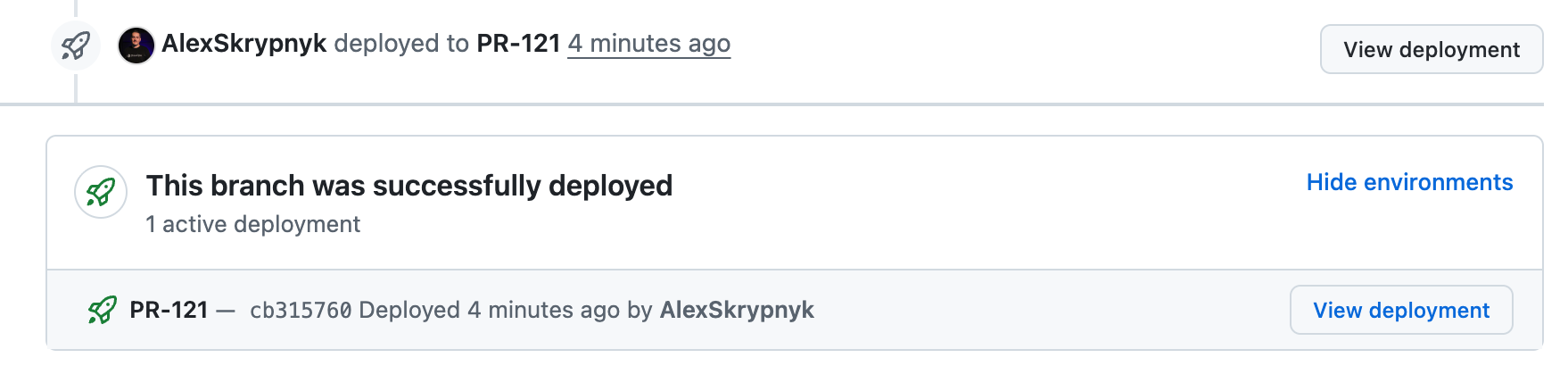
the pull request shows the deployment.
Environment variables
See the Notifications overview for the router, what a failed
channel stops, the shared VORTEX_NOTIFY_* variables, and the Location
column. The following table lists the variables that the GitHub channel
reads:
| Variable | Required | Default | Location | Description |
|---|---|---|---|---|
VORTEX_NOTIFY_GITHUB_TOKEN | Yes, unless GITHUB_TOKEN is set | GITHUB_TOKEN | Hosting | Classic GitHub personal access token with the repo scope |
VORTEX_NOTIFY_GITHUB_REPOSITORY | Yes | None | Hosting | Repository in owner/repo format |
VORTEX_NOTIFY_GITHUB_ENVIRONMENT_TYPE | No | VORTEX_NOTIFY_LABEL, then PR | .env | Name of the GitHub environment that each deployment is created in; the label default gives PR-123 for a pull request and the branch name, such as develop, for a branch |
VORTEX_NOTIFY_GITHUB_BRANCHES | No | None | .env | Exact branch names to report (comma-separated); empty reports every branch |
VORTEX_NOTIFY_GITHUB_BRANCH | No | VORTEX_NOTIFY_BRANCH | Hosting | Branch used as the deployment's ref |
VORTEX_NOTIFY_GITHUB_ENVIRONMENT_URL | No | VORTEX_NOTIFY_ENVIRONMENT_URL | Hosting | Environment URL that post_deployment attaches to the deployment |
VORTEX_NOTIFY_GITHUB_EVENT | Yes, unless VORTEX_NOTIFY_EVENT is set | VORTEX_NOTIFY_EVENT | Hosting | Deployment event: pre_deployment or post_deployment |
By default, each deployment label gets its own GitHub environment, so deploying 1 pull request doesn't mark another pull request's deployment as inactive.
Example
The pull request page shows the deployment status and a View deployment button that opens the deployed environment.